Inside Mnemova
How Mnemova Decides What You Study Each Day
When you open a deck in Mnemova and press Study, the app has to answer a small question very quickly: out of everything in this deck, which exercises should you see right now, in what order, and what happens to each one after you answer? I built that logic myself, and I want to explain exactly how it works — not in general spaced-repetition terms, but the actual rules the app follows. If you know them, you can set up your decks and settings so the app works for you instead of guessing at what it's doing.
Predictability was a design goal from the start. A study app asks you to trust it with a simple promise — "study what I show you and you won't forget it" — and that trust is easier to give when the rules are visible. So everything below is plain logic: no hidden weights, no model guessing what you need.
Step 1: find what's due
Every exercise you've studied has a small record attached to it: when you last saw it, how you rated it, and the date it's next due. When a session starts, Mnemova goes through the deck and keeps two kinds of exercises:
- New exercises — anything you've never reviewed. A new exercise counts as due immediately.
- Due exercises — anything whose due date is now or in the past.
Everything else is skipped. If you rated an exercise "Good" yesterday and it's scheduled for three days from now, it won't appear today, no matter how many times you open the deck. That's intentional: reviewing something you still remember well costs time and teaches you almost nothing.
Step 2: cap the session
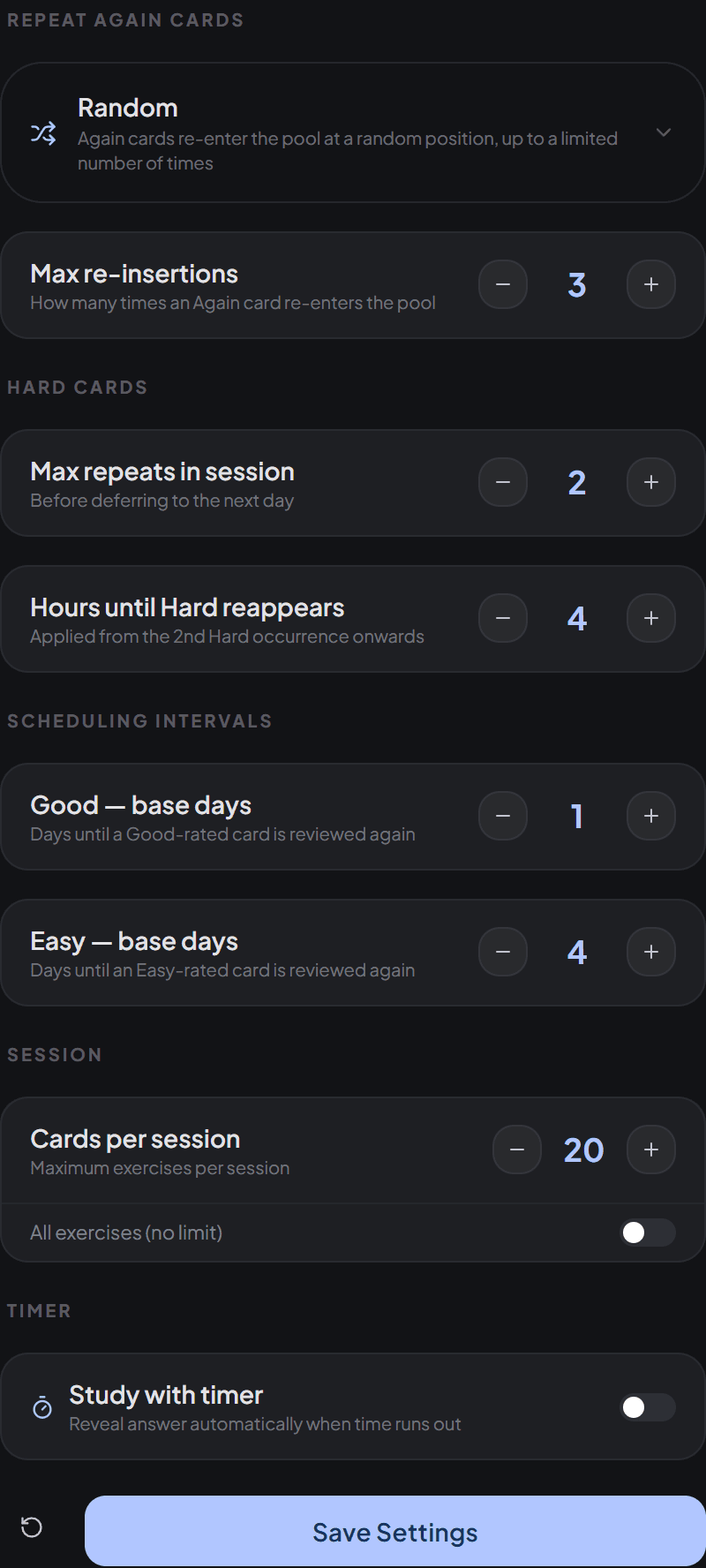
A deck with 300 new exercises shouldn't turn into a 300-exercise session. Mnemova caps each session at a number you choose in Study Settings under Cards per session. The default is 20. Turning on All exercises (no limit) removes the cap and includes every due exercise.
One detail matters here: when more exercises are due than the cap allows, Mnemova takes them in deck order. In a large deck, the exercises near the top get scheduled first, and the ones near the bottom join later sessions as the earlier ones move out to longer intervals. In practice this means two things:
- If some material matters more — the chapter for next week's exam, say — put it in its own deck or near the top of the deck.
- If you want to work through a big deck faster, raise the cap rather than starting several sessions in a row with a small one.
Step 3: shuffle fairly
Deck order decides which exercises make it into the session, but not the order you see them in. During the session, each next exercise is drawn at random from what's left, with every remaining exercise equally likely. That stops you from memorising the sequence ("the one after the photosynthesis question is always about chlorophyll") instead of the content.
This sounds trivial, but I got it wrong the first time. An earlier version split the pool into three sections and picked a section first, then an exercise inside it. Because the sections weren't the same size, the exercises in the smallest section — the end of the deck — came up far more often than they should have. In a long session that means seeing the same handful of exercises again and again while others barely appear. The fix was simply to pick uniformly from the whole pool, which is what it does now. It's a good reminder that "random" is easy to say and surprisingly easy to get subtly wrong.
Step 4: a second queue for the ones you missed
While you study, Mnemova keeps two queues: the exercises you haven't seen yet in this session, and a repeat queue for ones you struggled with. Before every exercise, it checks which queue is longer and draws from that one. If they're the same length, it flips a coin.
When an exercise goes into the repeat queue, it isn't placed at the front. It's inserted somewhere in the back half, so a few other exercises always come between your mistake and the retry. Seeing the answer and then being asked the same question two seconds later only tests your short-term memory; a gap forces you to actually retrieve it.
What your rating does
After each exercise you give one of four ratings: Couldn't recall (Again), With difficulty (Hard), After hesitation (Good), or Perfect recall (Easy). Each one does something different, and the numbers below are the defaults — all of them except one can be changed in Study Settings.
Again: it comes back, today and next time
An exercise you couldn't recall goes into the repeat queue for this session. How often it comes back depends on the Repeat Again cards setting:
- Random (default) — re-inserted up to three times.
- Until Correct — keeps coming back until you answer it without pressing Again.
- Once — one more try, then it's done for today.
- Never — no retry in this session.
Whatever happens in the session, a card that ends on Again is marked due immediately, so it's in your next session too. An older version only reset this in some cases, which meant a card you had just failed could keep its old due date and disappear for days — exactly the card you most needed to see.
Hard: a short retry, then a short delay
Hard means you got there, but it took effort. The first couple of times (two by default) you rate an exercise Hard in a session, it goes back into the repeat queue for another try. If it's still Hard after that, Mnemova stops repeating it and schedules it a few hours later instead — four hours by default. Pushing the same difficult exercise at you ten times in a row is mostly frustrating; a break and a fresh attempt later in the day works better.
Good and Easy: intervals that grow with a streak
Good and Easy push the exercise out by a number of days. The first Good schedules it 1 day out; the first Easy, 4 days out. Each time you give the same rating again in a row, the interval grows by 2 more days:
- Good, Good, Good, Good → 1, 3, 5, then 7 days.
- Easy, Easy, Easy → 4, 6, then 8 days.
- Good, then Easy → the streak starts over, so the Easy gives 4 days, not more.
You can change the starting values (Good — base days and Easy — base days). The +2-day step is fixed and not shown in settings.
This is a deliberate difference from classic SM-2, where intervals are multiplied by an "ease factor" and grow very quickly — a card can go from 6 days to 15 to 37 to over three months. In Mnemova intervals grow steadily instead of exponentially. You review a little more often, and the schedule stays easy to predict: if you know your last few ratings, you know when the exercise comes back.
The reason is the kind of studying most people do. Exponential intervals are ideal for keeping thousands of facts alive over years. But a lot of studying has a deadline — an exam in six weeks, a language test at the end of the semester. If a card jumps out to three months after a few good answers, it may not come back before the date that matters. Steady growth keeps material in rotation through that window, and a few extra reviews of things you know well cost only seconds each.
Putting it together
A typical day looks like this: you open a deck, Mnemova collects everything new or due, keeps the first 20 in deck order, and shuffles them as you go. Mistakes cycle back a few exercises later. When the session ends, every exercise you saw has a new due date based on your last rating and your streak, and tomorrow's session is built the same way.
None of this uses AI. The AI features in Mnemova help you create exercises from your notes; the schedule itself is plain rules applied to your own answers, so the same ratings always give the same result. The most useful thing you can do is rate honestly. Pressing Easy on something that took you ten seconds pushes it out further than you're ready for. Pressing Again when you actually knew it costs you an extra review. Neither is a disaster, but the schedule is only as good as what you tell it.
If you want to read more about the research behind spacing reviews, start with How Spaced Repetition Works. If you're setting up a new deck, see Turning Notes Into Flashcards That Actually Work.